


Health Diary by MedM
4.7291.00 Reviews
App Specs
- Version
- 3.11.3
- Updated On
- License
- Free
- Downloads
- 100,000+
- Developer
- MedM Inc
- Categories
- Medical
- Platform
- Android
Screenshots
 Analysis by AppCompare
I tend to think of a health diary as a place to make everyday measurements useful, not as a substitute for medical advice. That distinction matters with Health Diary by MedM: it is a free medical app from MedM Inc for collecting personal and family health records, and its value depends less on how many numbers it can hold than on whether you can record them consistently. I’d consider it when several kinds of health information need to live together, rather than scattered across notes, paper logs and separate trackers.
A practical home for ongoing records
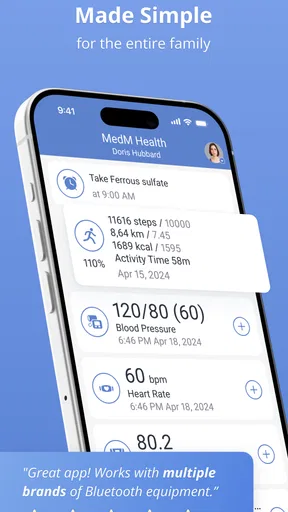
The app’s focus is broader than a step counter or a single-purpose blood pressure log. Its stated scope includes blood pressure, weight, temperature, glucose, activity and sleep. That mix makes it relevant to households where different people track different things, or where one person wants to keep a daily record alongside occasional readings. The family-log idea is useful, but it also means that a little organization at the start can prevent entries from becoming a pile of numbers with unclear context.
For example, if I were logging a morning blood pressure reading, I’d record it at roughly the same point in my routine and add any context the app allows, rather than treating one result as a verdict. A reading after a rushed commute may not be comparable to one taken after sitting quietly. Keeping that routine steady is a more useful habit than checking charts repeatedly for immediate reassurance.
How it fits beside other health tools
Compared with a paper notebook, a phone-based diary is easier to carry and can make a longer history easier to review. Compared with a dedicated device companion, its appeal is the range of health categories it brings into one place. The trade-off is that an all-purpose log may not offer the depth or device-specific coaching of an app built around one measurement or one wearable. If you mainly want detailed exercise analysis, a specialist fitness tracker may suit you better; if you want a record spanning several everyday measures, this wider scope is more compelling.
I would also separate recording from interpretation. Charts can help me notice that a measure has been changing over time, but they cannot explain why or decide what action is medically appropriate. For symptoms, medication decisions or readings that concern you, the sensible next step is a qualified clinician—not a conclusion drawn from a graph.
Who is likely to get the most from it
I see the clearest use for someone who has been asked to keep a record between appointments, a family member helping organize routine measurements, or a person who wants one consistent place for several kinds of personal health information. A diary is especially helpful when memory is the weak link: instead of trying to recall what a reading was last week, you can maintain a record as you go.
It is less suitable if you want an app to diagnose a condition, automatically manage every part of your care, or turn activity data into a complete clinical picture. It may also feel like unnecessary work if you only take an occasional measurement and have no reason to review a history. In that case, a simple note or the companion app for a single device could be the lower-friction choice.
Worth Reading Before You Choose

Flipboard Shows What News Apps Must Do Beyond the Feed

Switching to Android Auto Means Rethinking Your Driving Routine

Google Calendar Makes a Crowded Week Easier to Manage

Ludo King Makes the Most of the Minutes Between Plans

Baby Panda World Brings Quick Play to Modern Phones, but Its Game Library Feels Busy

ESPN’s Live Game View Makes Following Close Games Easier
What to know before building a routine
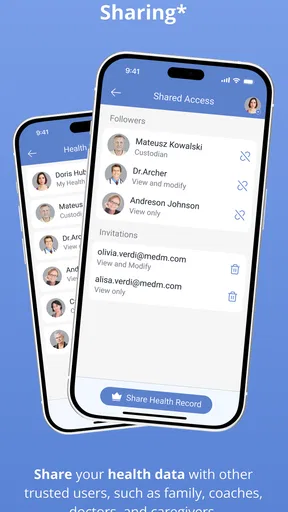
Because this is health information, I’d make privacy a decision point before entering details about myself or relatives. Read the app’s current privacy and account options, and think about who will use the phone and who should be able to see each person’s records. A family log can make caregiving easier, but only when everyone understands how information is being handled. I would not assume that a health diary’s convenience automatically answers questions about sharing, backup or access.
It is also worth deciding what you actually need to track before turning on every available category. A short, repeatable routine—perhaps one measurement and a note when something unusual happens—is easier to sustain than a long checklist that quickly becomes a chore. If you are recording for a clinician, ask which measurements and timing are useful; that keeps the diary focused on decisions rather than collecting data for its own sake.
Getting Started with Health Diary
First off, the setup was super straightforward. After downloading Health Diary by MedM, I was greeted with a clean and intuitive interface. The app guides you through the initial setup, asking for basic info like your age, weight, and health goals. This personalized approach makes it feel like the app is tailored just for you.
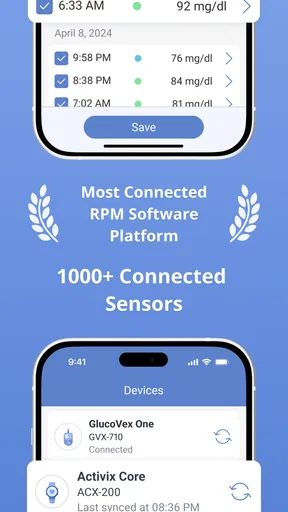
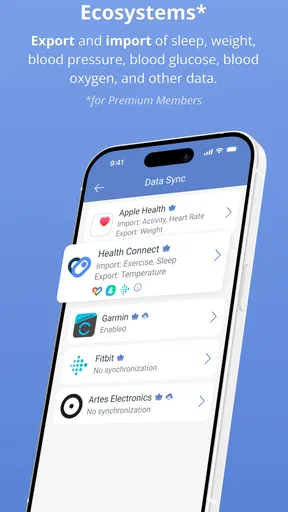
The app is compatible with a slew of devices, which is a huge plus. Whether you’re using a Fitbit, an Apple Watch, or any other popular health gadget, syncing them is a breeze. I found the integration to be seamless, and it started pulling data without a hitch.
Tracking Your Health
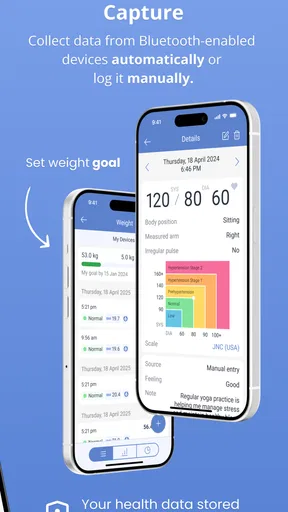
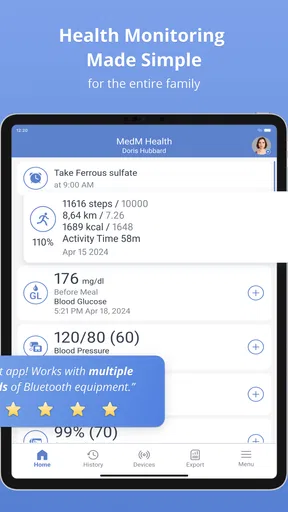
One of the standout features of Health Diary is its comprehensive tracking capabilities. You can log everything from blood pressure and heart rate to sleep and mood patterns. I especially loved how easy it was to enter data manually or let my devices do the heavy lifting.
The app displays your data in neat charts and graphs, making it incredibly easy to spot trends over time. For someone like me who’s a bit of a data nerd, this feature is pure gold. Seeing how my habits affect my health on a day-to-day basis has been enlightening.
A low-effort routine makes the record more useful
For a realistic day-to-day workflow, I’d attach logging to something I already do. After taking a morning measurement, I could enter it before breakfast; in the evening, I could add activity or sleep information when winding down. The point is not to fill every category every day. It is to make the measurements that matter regular enough that a clinician or family member can understand the sequence later.
One less obvious benefit of keeping unlike measurements together is the chance to notice timing, not just totals. If I record weight, sleep and activity across the same stretch, I can bring a more coherent account of my routine to an appointment. That still does not establish cause and effect, but it can help me ask better questions than a single isolated reading would.
Manual entry has its own trade-off. It gives me control over exactly what I record, but it depends on remembering to do it and entering the right value in the right place. Device syncing can reduce that effort, but I would still check the first few imported entries against the source device. A small setup mistake or a missed connection can make a chart look incomplete, and a tidy graph is only as dependable as the records behind it.
User-Friendly Features
What really sets Health Diary apart is its user-friendly design. The navigation is intuitive, and I never found myself lost or confused. The developers clearly put a lot of thought into making the app accessible to users of all tech abilities.
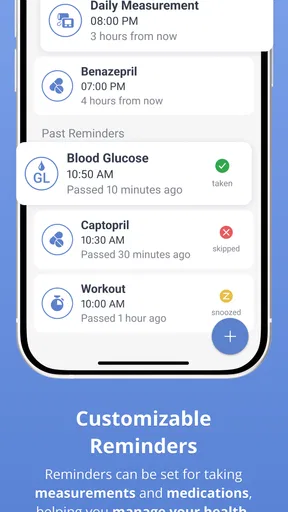
Another feature I found handy was the reminders. You can set up custom alerts for medication, exercise, or even just to drink more water. It’s like having a little digital nudge to keep you on track with your health goals.
Small choices that prevent messy records
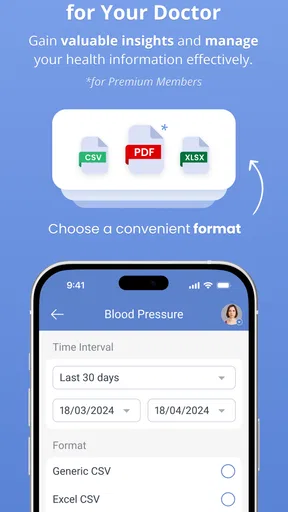
Before sharing a history with a health professional, I’d review the dates and units rather than sending a long run of entries without context. A concise period that answers a specific question is often easier to discuss than months of unrelated tracking. I’d also keep notes factual: what was measured, when it was measured, and any relevant circumstance, rather than writing a diagnosis into the diary.
Reminders are most helpful when they prompt an action I have already agreed to take. Too many alerts can become background noise, so I’d start with only the measurements or habits I genuinely need to remember and adjust later. The same approach applies to family use: one person can help with recording, but the routine should be clear enough that entries do not get attributed to the wrong person.
If you are choosing between this and a paper log for a care task, consider who needs to read the record. A paper notebook can be easier for someone who avoids phones, while a digital diary is more convenient to carry and review on the device. Neither format guarantees accuracy. The better option is the one the person taking the measurements can keep up with and bring to the appointment.
Privacy and Security
In today’s digital age, privacy is paramount. Health Diary takes this seriously, offering robust security measures to protect your personal data. I felt confident knowing my health information was safe and secure. The app doesn’t share your data without explicit permission, which is reassuring.
Questions worth settling before relying on it
People often wonder whether a diary can replace a doctor’s log or an official care plan. I would treat it as a personal record that may support a conversation, not as an official medical system unless a clinician specifically agrees to use it that way. Bring the phone or a suitable summary to an appointment and ask whether the format and measurements are useful for your situation.
Another practical question is whether the app makes sense for someone who does not own a compatible device. Manual entry is part of the experience described here, so a connected gadget is not the only reason to keep a record. Still, someone who wants automatic collection should check device compatibility before building a routine around syncing; compatibility can vary, and I would not buy a device on the assumption that it will connect without checking first.
Health Diary is free to install, has an Everyone age rating, and includes in-app purchases listed from $5.99 to $99.99 per item. I’d start with the free experience and decide whether any paid option addresses a real need before spending. Its current version is 3.9.1513, and the app supports Android from version 5.0. Those details matter most when you are checking whether an older phone can run it or deciding whether to keep using a version already installed.
Room for Improvement
While I’m a fan of the app, there are a few areas that could use some polishing. For instance, I wish the mood tracking feature was a bit more detailed, allowing for more nuanced entries. Also, while the app is generally stable, I did experience a couple of minor glitches, but nothing that disrupted my overall experience.
Its track record and what I would watch
Health Diary has been available since May 18, 2014, and the current version indicates that it is still being maintained as a product rather than existing only as an old download. That history can reassure someone who wants an established diary, but an older release date alone does not prove that every current phone, wearable or workflow will behave exactly as expected. I would check that the installed version works with the devices I actually use before relying on a new routine.
The app has an average rating of 4.1 from around 3.7 thousand ratings, alongside 234 written reviews and over 100 thousand installs. I see that as a sign that it has found a meaningful audience, not as a guarantee that it will fit every household. Ratings cannot tell me whether a particular device syncs reliably for my setup or whether its organization matches a clinician’s preferred record, so those are the details I would test early.
For existing users, the practical question is whether a new version changes the parts of the routine they depend on. I would read the in-app release notes when updating, then confirm that key categories, reminders and any connected-device flow still behave as expected. That is a sensible habit for any health record app: keep the routine stable, but do not assume an update has no effect on a workflow that matters to you.
Final Thoughts
All in all, Health Diary by MedM is a fantastic tool for anyone looking to take control of their health. Its robust tracking features, coupled with an easy-to-use interface, make it a must-have app. Whether you’re a fitness enthusiast or just starting your health journey, this app has something for everyone.
If you’re ready to dive into a healthier lifestyle, give Health Diary a try. It’s like having a personal health assistant in your pocket, and I’m pretty sure you’ll love it as much as I do!
My recommendation depends on the job
I would recommend it most readily to someone who wants a personal or family record across several health measures and is willing to maintain it. Its value is in bringing readings and routine information together, not in replacing a clinician, a specialist monitor or a full fitness platform. If your goal is simply to count steps, a dedicated activity tracker is likely more direct; if you need a structured record over time, this diary is the more relevant kind of tool.
Before making it part of a care routine, I’d try one category first, enter a few representative records and check that the result is easy to understand. Then add other categories only when they serve a clear purpose. That small test answers the most useful questions—whether the workflow feels sustainable, whether any device connection works as expected, and whether the history is readable enough to share—without turning health tracking into another demanding project.
Pros
- User-friendly interface makes tracking easy.
- Supports a wide range of health metrics.
- Syncs seamlessly with various devices.
- Data is secure with strong privacy controls.
- Customizable reminders for medication.
Cons
- Limited customization for data visualization.
- Requires internet for full functionality.
- No integration with some fitness apps.
- Free version has ads that can be intrusive.
- Occasional syncing delays reported.
FAQs for Health Diary by MedM
What features does Health Diary by MedM offer?
Health Diary by MedM provides a comprehensive suite of tools for tracking various health metrics. Users can log vital signs such as blood pressure, glucose levels, and body temperature. The app also supports integration with numerous devices for automatic data import, making it convenient to maintain a detailed health record.
Is Health Diary by MedM compatible with my device?
Health Diary by MedM is designed to work on both Android and iOS platforms. It supports a wide range of smartphones and tablets. To ensure compatibility, check the specific system requirements on the app's download page on Google Play or the App Store before installing.
Can I share my health data with my healthcare provider?
Yes, Health Diary by MedM allows users to export their health data in various formats, which can be shared with healthcare providers. This feature facilitates better communication between patients and doctors, enabling more informed healthcare decisions and personalized treatment plans.
Is my personal health data secure with Health Diary by MedM?
Security is a priority for Health Diary by MedM. The app uses encryption to protect your data and offers secure cloud backup options. Users are encouraged to read the app's privacy policy to understand how their data is managed and to ensure their information remains confidential.
Does Health Diary by MedM require a subscription?
Health Diary by MedM offers both free and premium subscription options. The free version provides basic tracking features, while the premium version unlocks additional features such as advanced analytics and priority customer support. Users can choose the option that best suits their needs and budget.


